Process Settings


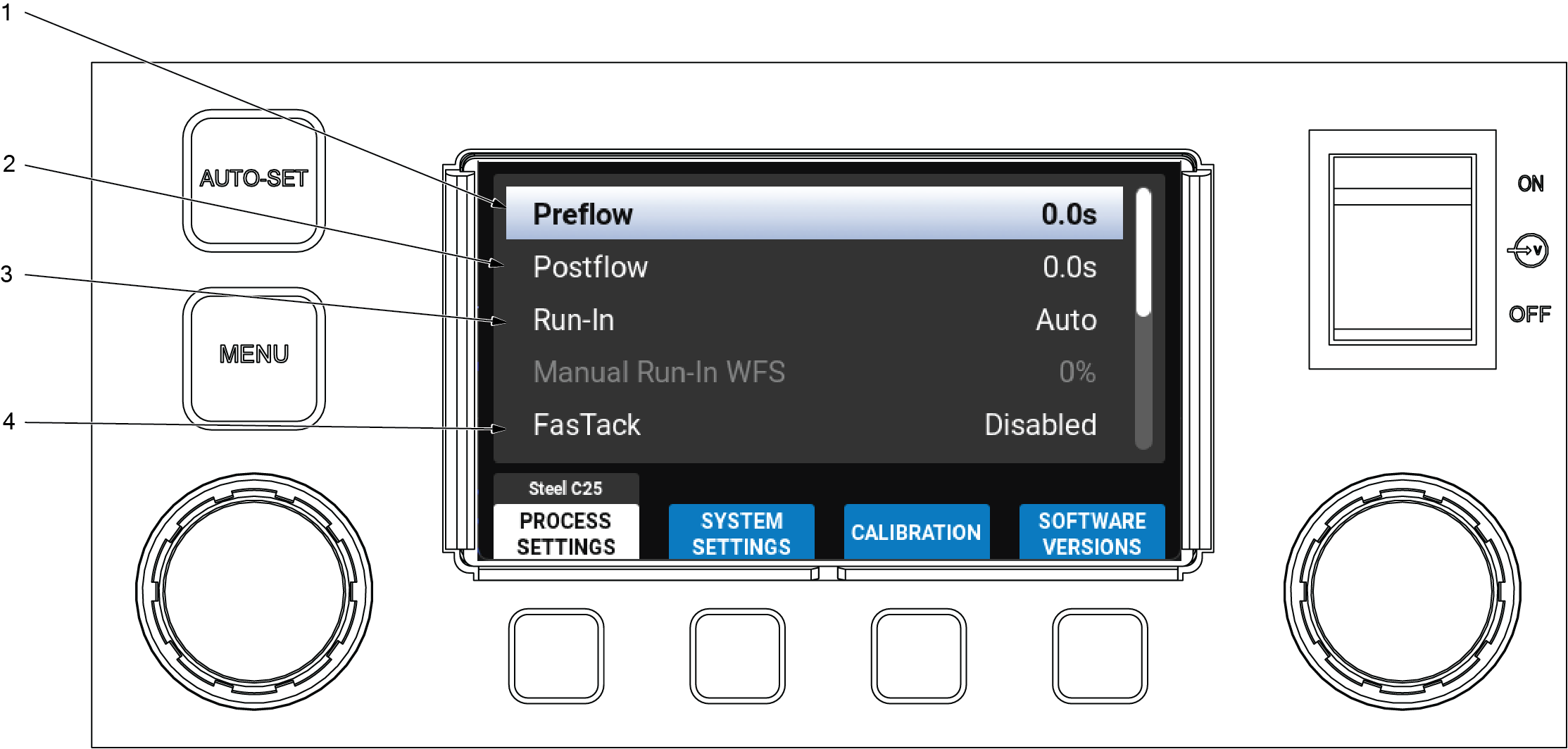
| 1 | Preflow |
Controls the amount of time shielding gas flows after the trigger is depressed and prior to feeding wire. Preflow is used
to purge the immediate weld area of atmosphere. It also aids in consistent arc starts. Preflow settings range from 0 to 5
seconds. To adjust, press either knob to show time menu, change the time setting up or down with right knob, then press either
knob to enter the selected setting.
| 2 | Postflow |
Controls the amount of time that shielding gas flows after welding stops. Postflow is used to cool wire and weld, and to prevent
contamination of the weld. Postflow settings range from 0 to 5 seconds, with factory preset at 0 seconds. To adjust, press
either knob to show time menu, change the time setting up or down with the right knob, then press either knob to enter the
selected setting.
| 3 | Run-In |
Run-In (Smooth-Start™) is a feature that reduces the wire speed prior to the welding arc being struck to produce smoother
arc starts with less spatter.
Run-In Setup
To change setting, use either knob to highlight Run-In, then press either knob to enter Run-In Menu. Use the right knob to
choose among the options listed below. Press either knob to select setting.
| l | Manual When Run-In is set to Manual, it can be set to a percentage of the wire feed speed. To adjust the percentage, press either knob to enter the percentage menu, adjust the percentage up or down with the right knob, and press either knob to select the percentage. |
| l | Auto (Default) When Run-In is set to Auto, the welder determines the optimal Run-In wire feed speed for each start. |
| l | Disabled When Run-In is set to Disabled, the Run-In wire feed speed is the same as the set wire feed speed. |
| 4 | FasTack™ |
Enabling FasTack reduces arc start time by automatically increasing the Run-In speed when doing repetitive arc starts. FasTack
automatically uses a slower wire feed speed when the wire is cool and a faster wire feed speed when the wire is hot. Default
setting is Enabled. To adjust, use either knob to highlight FasTack, then press either knob to enter the FasTack menu. Use
the right knob to highlight which option you want, then press either knob to select setting. FasTack can be used while Run-In
is set to Manual or Auto.
| 5 | Crater Setup |
When the crater function is enabled, it will ramp the output down to limit the void or crater at the end of the weld.
To change setting, use either knob to highlight Crater, then press either knob to enter Crater Menu. Use the right knob to
enable Crater, and its associated options listed below. Press either knob to select setting.
| l | Crater Wire Speed When Crater is set to Enabled, the wire feed speed can be set to a percentage of the wire feed speed selected on the preset screen. To adjust the percentage, press either knob to enter the percentage menu. Adjust the percentage up or down with the right knob, and press either knob to select percentage. |
| l | Crater Voltage When Crater is set to Enabled, the voltage can be set to a percentage of the voltage selected on the preset screen. To adjust the percentage, press either knob to enter the percentage menu. Adjust the percentage up or down with the right knob, and press either knob to select percentage. |
| l | Crater Ramp Time When Crater is set to Enabled, the ramp time may be adjusted. The ramp time will adjust how quickly the setpoints ramp down to the selected percentages listed above. To adjust the ramp time, press either knob to enter the ramp time menu. Adjust the time up or down with the right knob, and press either knob to select ramp time. |
| l | Crater Time When Crater is set to Enabled, the crater time may be adjusted. The crater time will adjust the total time spent in crater. To adjust the crater time, press either knob to enter the crater time menu. Adjust the time up or down with the right knob, and press either knob to select crater time. |